
Every shift covered by someone qualified to work it.
Axiom Shift is scheduling built for how a neurodiagnostic department actually staffs: qualification-restricted units, 24/7 monitoring beside a weekday lab, specialized procedures only certain techs can work, travelers on contracts, and students who are present but not coverage. It drafts the month, flags what a spreadsheet hides, and remembers who gave up their weekends.
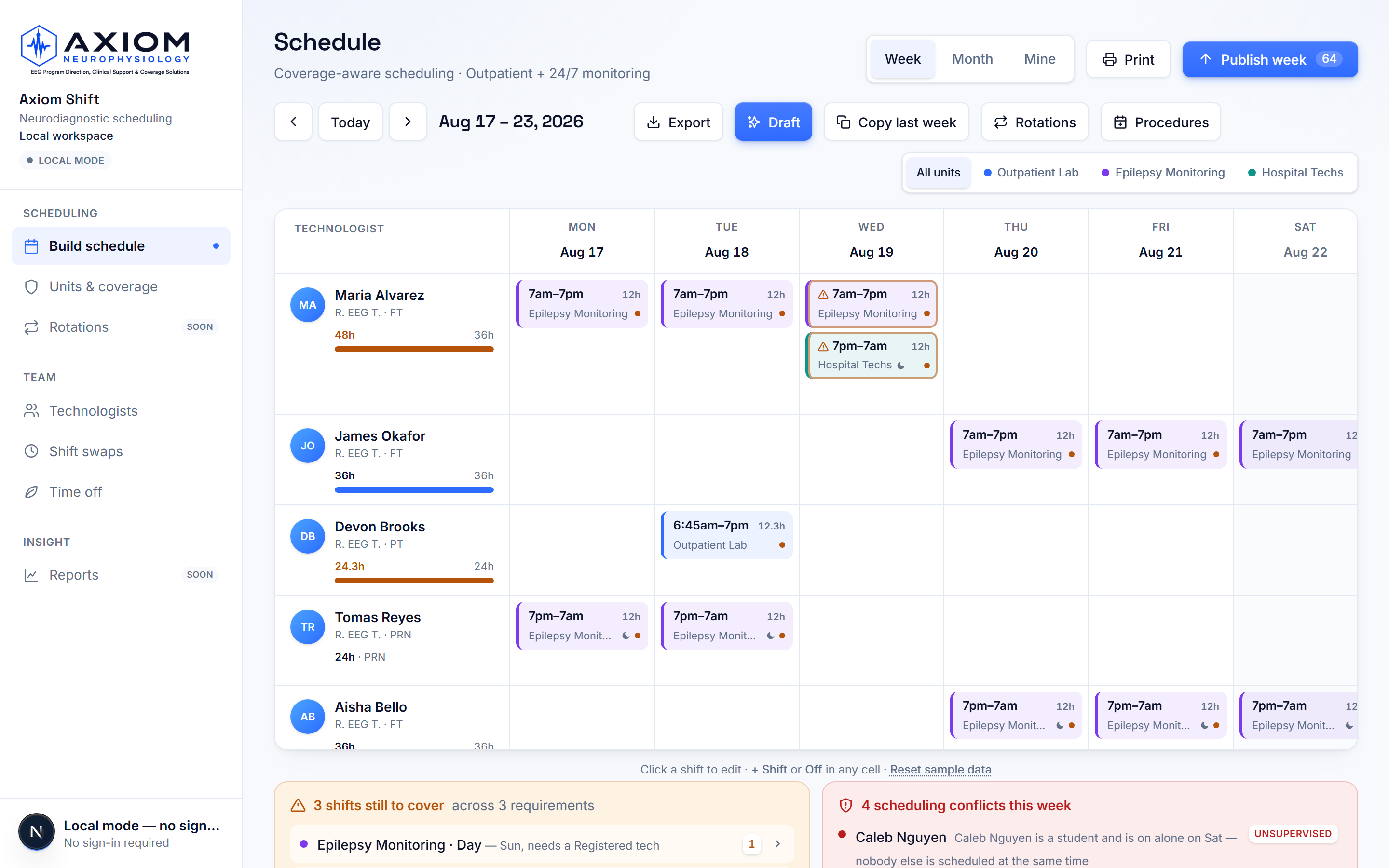
Live product, synthetic demo workspace — no patient information.
Built from the rules a real department runs on
Every capability below is live in the product today — nothing here is a roadmap item wearing product language.
Coverage that knows the rules
Each unit states what it needs — two on hospital days, three on the floor over the midshift, an EMU that only a registered tech can run. The schedule is checked against those requirements, and a person who cannot do the work is never counted as covering it.
Draft a month in seconds
One button lays out a week or a month from the requirements and the roster — qualifications, time off, rest rules, and contracted hours all respected. It proposes and a human decides; anything it cannot safely fill is reported with the reason, never quietly staffed with whoever was left.
Specialized procedures route themselves
Book a Wada, Phase II, VER, or ECOG onto a date, and only techs trained on it can be scheduled to it — the draft places them, the picker marks everyone else, and the conflict checks catch an untrained assignment.
Guardrails on every mistake a spreadsheet hides
Double-booking, short rest, over-long stretches, shifts on approved time off, unqualified assignments, a student rostered alone, a traveler scheduled outside their contract dates — surfaced in plain language, against the exact shifts involved.
Fairness the team can see
The schedule remembers who worked the last four weekends and the recent nights, shows it beside every candidate, and weighs it when drafting — so the bad shifts stop landing on the same people by accident.
The 5:45am call-out, handled
Someone calls in sick and one button answers with ranked replacements — qualified for the slot, rested, under their contracted hours, fairness history beside each name — or releases the shift so every qualified tech can claim it with one tap. The sick day is recorded on the schedule, not remembered.
Ask the schedule in plain English
“Who can cover Saturday?” “Why is Maria at her hours?” “Who's worked the most weekends?” Answered by the same ranking and coverage engines that build the schedule — deterministic and engine-backed, so the answer is never invented.
FTE reports management actually asks for
Required FTE from the written coverage rules, contracted FTE from the roster, scheduled FTE from the real schedule — side by side with the arithmetic shown, plus PRN reliance and uncovered hours. A 3/12 tech reads as the 0.9 FTE their contract is, never as a shortfall.
What-if absence planning
Preview losing any technologist for any stretch — FMLA, a resignation, a long vacation — and see exactly which shifts go uncovered and which procedures nobody else scheduled can run. Before the crisis, not during it.
Several sites, one login
A regional lead belongs to every site they oversee and switches between them in one click. An overview puts every site's week side by side — coverage short, still a draft, or covered — judged by exactly the rule each site uses. A technologist who floats is on both rosters and gets one calendar feed.
Techs run their own week
Every technologist gets their own view: their shifts, their hours against contract, open shifts they are qualified for with one-tap volunteering, time-off requests, shift swaps, and a private calendar feed that puts published shifts into the phone calendar they already use.
Travelers, students, and PRN modeled honestly
Contract staff exist to the schedule only inside their assignment dates and are filled toward their guaranteed hours first. Students appear on the grid but never count toward required staffing. PRN is held back as the last resort it is priced to be.
Publish deliberately
Drafts are invisible to the team until the week is published, and unpublished shifts are labeled so nobody plans childcare around a plan that may still change. Before anything goes out, the confirm names who it pushes into overtime and any shift landing on a day someone has approved off. Export the schedule and an hours summary as spreadsheets for payroll.
Staffing checked against study volume
Paired with OrderFlow, Shift reads how many studies are booked each day for the next two weeks and checks it against who is scheduled: "15 studies, 2 techs staffed, about 4 per tech, short by 2." The per-tech number is your department's own setting, stated every time it is used. Approved time off travels with the schedule, so OrderFlow never counts someone on leave as available.
Coverage calendar: readers and the pager
A separate calendar for who is covering, not who is working: the day and night pager, the adult reader and the pediatric reader, one name per lane per day. Reading physicians come from the roster (imported from OrderFlow when paired) and are never counted as staffing. When paired, the reader of the day flows into OrderFlow so nobody types it twice.
Security your IT department can check
Two-step verification for any account, and a workspace can require it of everyone. Each site's data is walled off in the database rather than by the screens, roles are enforced on the server, private things — a person's calendar link, the reason on a time-off request — are readable only by the person they belong to, and every schedule change records who made it. A written security review is available for IT, including what we do not hold.
Changes that stay accountable
Move a shift to somebody else from the shift itself — it keeps its identity and the person taken off is told. Clearing a day is one undo away. When someone leaves, an administrator removes their access in a click; their shifts, hours and history stay with the department, and the removal is in History.
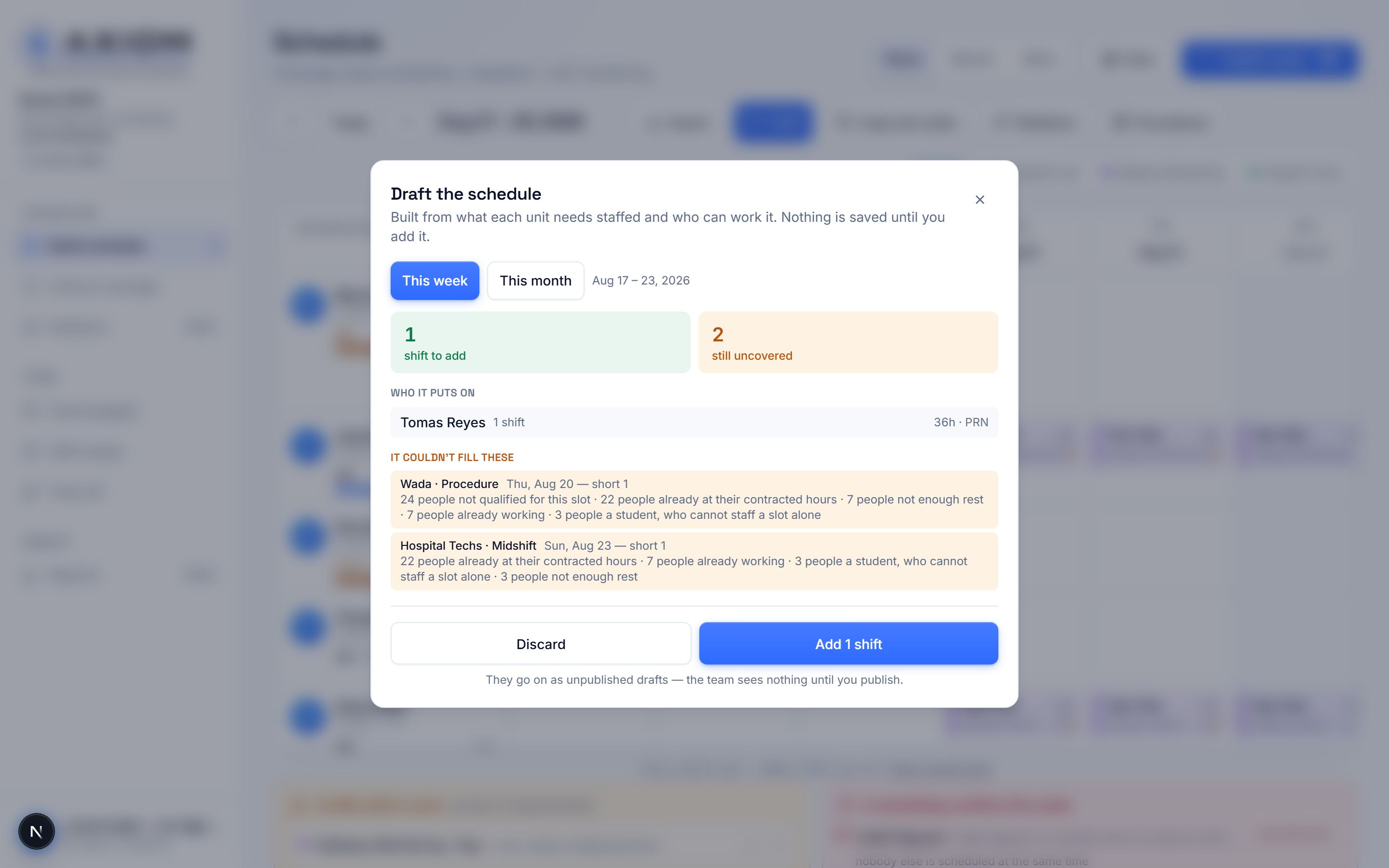
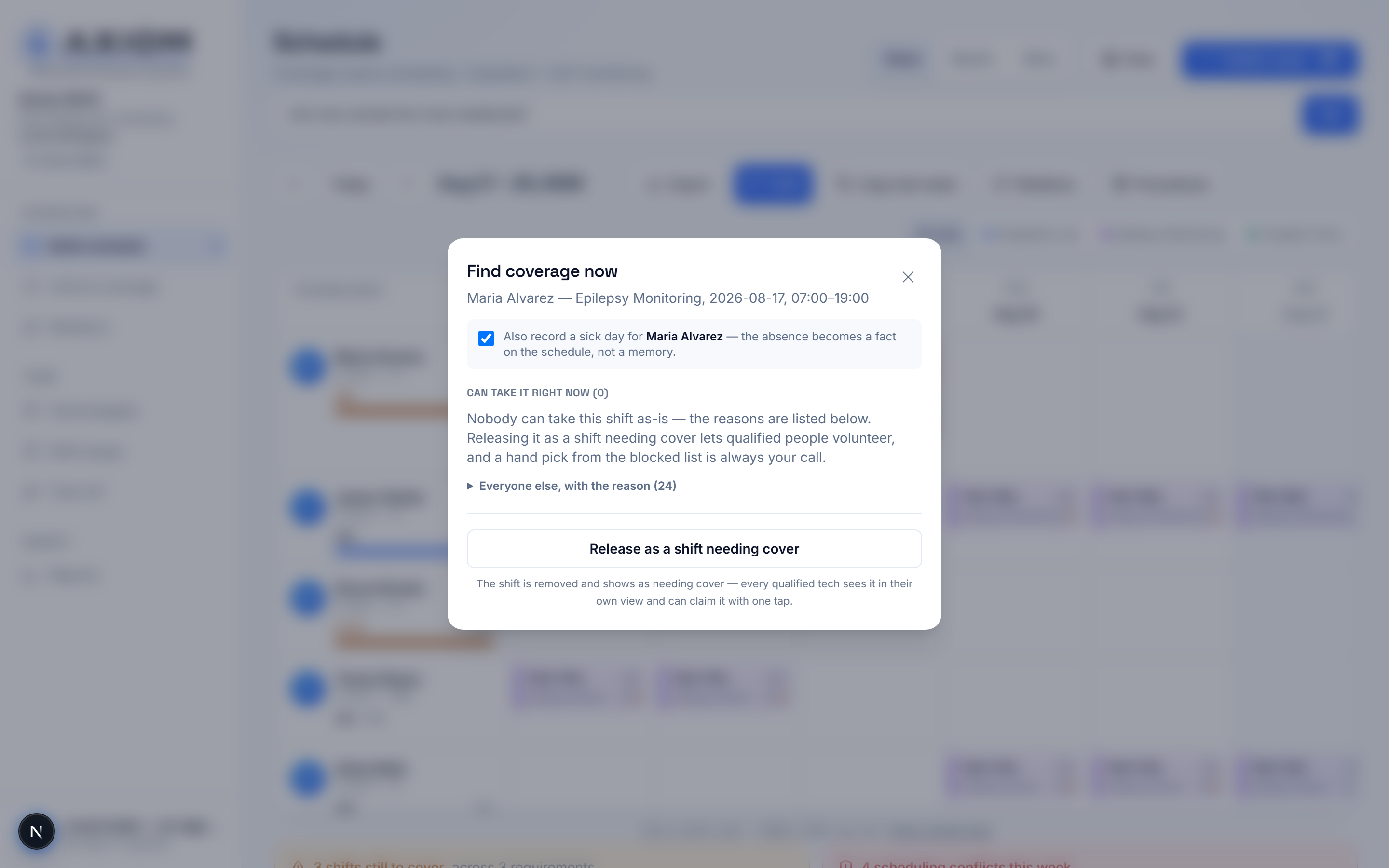
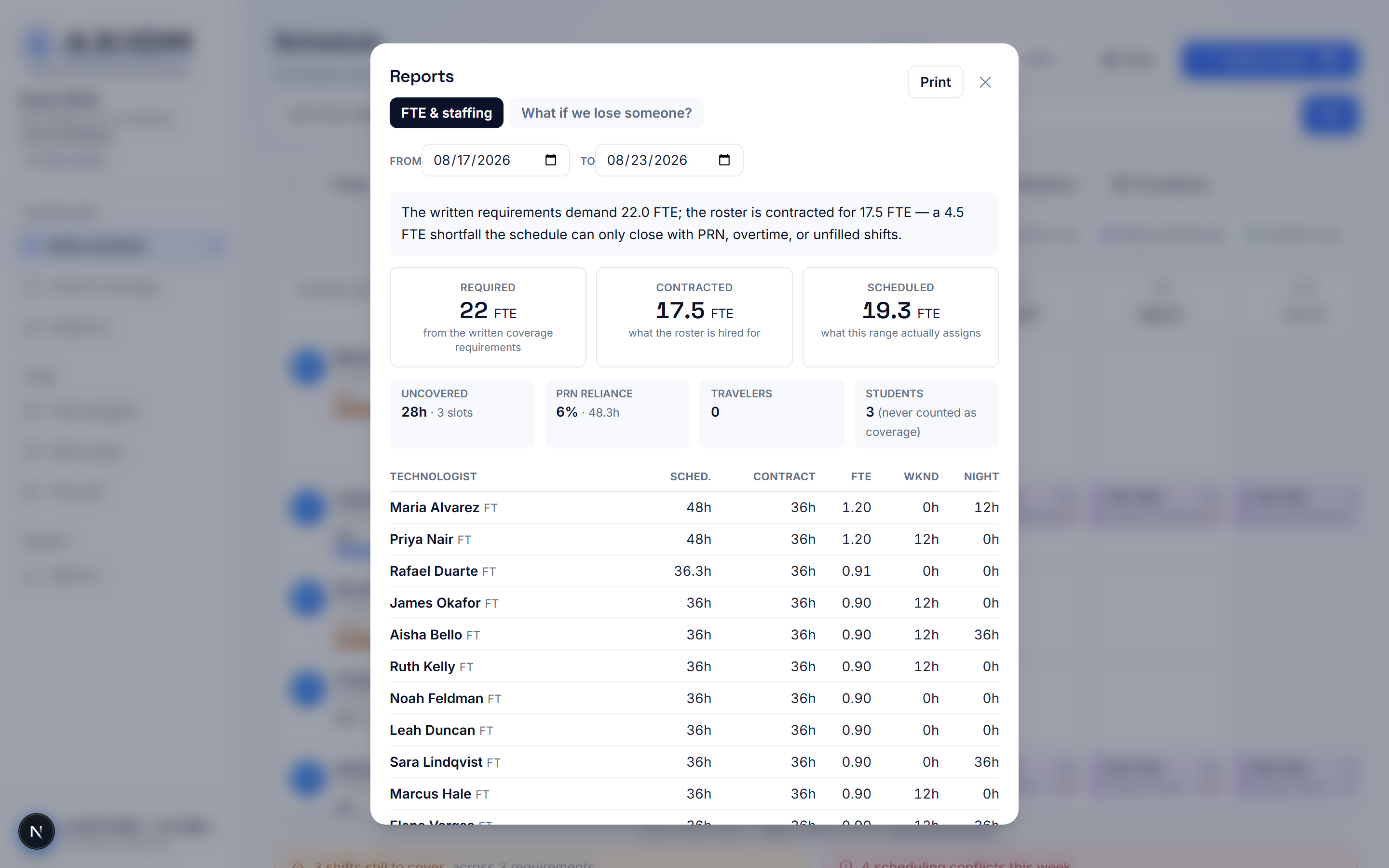
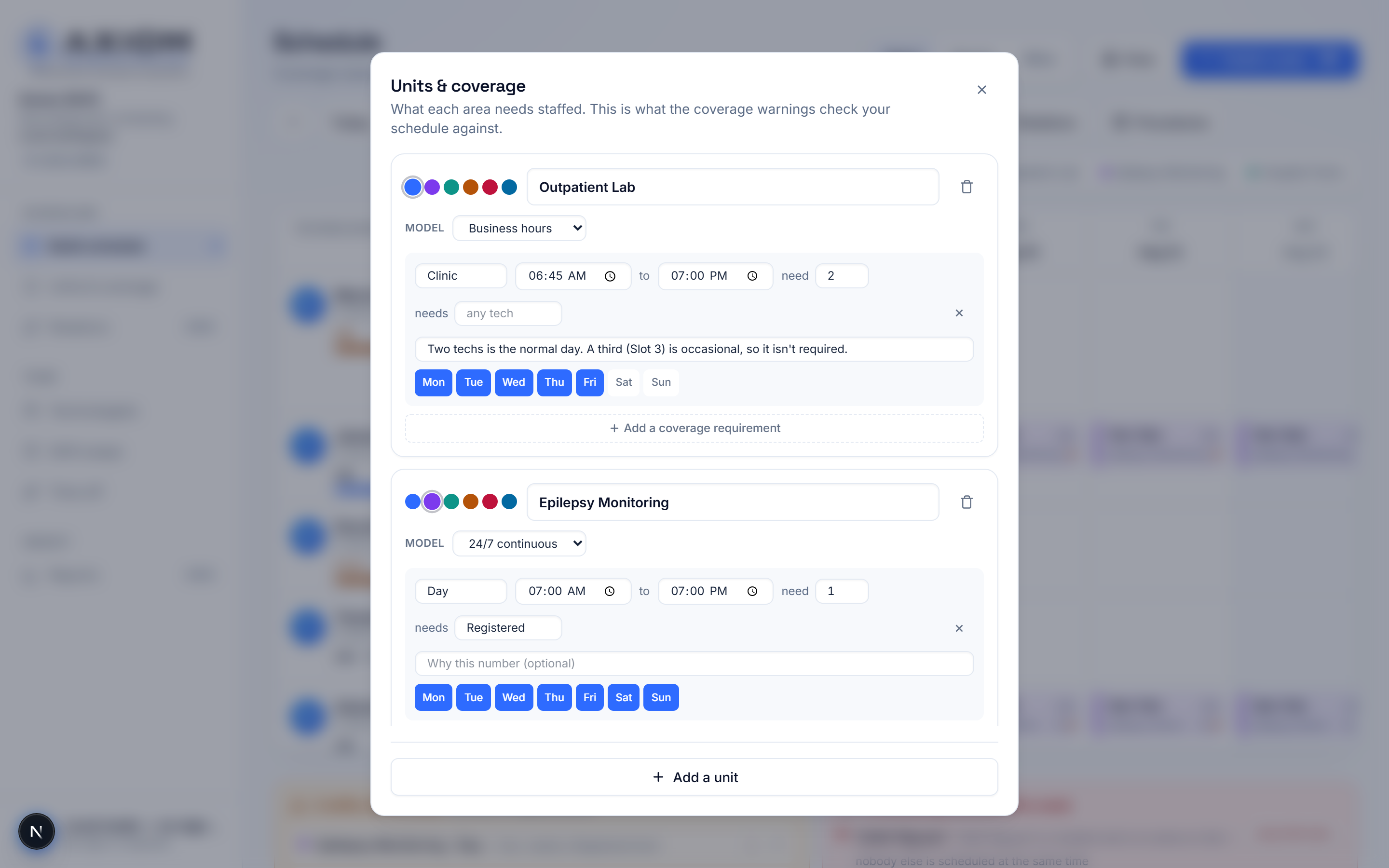
No mockups or concept art — screenshots straight from the live app, running a synthetic demo workspace. No patient information appears in any image.
Three jobs, one schedule
Builds a month in one sitting instead of an evening a week — with every gap, conflict, and volunteer in front of them.
One place that answers “when am I on?” — with swaps, time off, volunteering, and shifts in their own phone calendar.
A schedule that can defend itself: requirements stated, exceptions flagged, fairness visible, hours exportable.
The EHR owns the clinical record. The acquisition system owns the waveform. Axiom owns the operation.
Axiom OrderFlow coordinates EEG orders, studies, equipment, reader follow-up, and billing readiness. Axiom Shift coordinates the people and coverage behind that work. Connected workspaces link clinical identities, qualifications, availability, and workload. Published availability is reviewed in OrderFlow before it is applied; each coverage view identifies the people and equipment evidence it evaluates.
Axiom does not replace the EHR, acquisition systems, payroll, HR platforms or physician interpretation. It is the operational layer that connects them.
The work, and the people who do it
Two products, one department. OrderFlow governs the order-to-report workflow — intake, validation, study lifecycle, billing readiness. Shift staffs the team that carries it out. Each stands alone; together they cover the department's day from both sides.
What needs doing: orders in, studies tracked, reads accounted for, billing readiness governed.
Explore OrderFlow →Who is doing it: coverage requirements met, qualifications respected, fairness visible, the month drafted.
See Shift live ↗Departments running both connect them from Shift’s OrderFlow page: a published schedule arrives in OrderFlow as a draft availability batch for a supervisor to review, and OrderFlow reports back how many studies are scheduled each day — counts only, never patient information. Each site pairs with its own OrderFlow workspace.
Priced to be a department decision
Simple list pricing, invoice-based, no patient data involved. Pilots are paid and fixed-scope; the fee credits toward year one on conversion.
- One department, up to 30 scheduled staff — then $15/person/mo
- Set it up yourself at no charge, or guided setup at $1,500
- Pilot: $1,500 for 60 days, credited toward year one
- Everything in Standalone, same included staff count
- Overtime in dollars — every week and every draft priced before it's published, at each person's rate
- On-call tracking with fairness counting, notifications, and 'who is on call tonight?' answers
- Credential & competency expiry tracking — 60/30/7-day warnings and scheduled-while-expired flags
- Payroll-ready export — weekly overtime split, per pay period, formatted for hand-off
- Text-message notifications for published schedules, swaps, and on-call assignments
- Each site is its own workspace with its own roster, coverage rules and OrderFlow link — one account can belong to all of them
- A regional lead switches between sites in one click and sees every site’s week on one page
- One contract, one invoice. Three sites: $1,750/mo. Five: $2,750/mo.
- Beside an OrderFlow Clinic or Department package — half the standalone rate, and the discount exists only on the pair
- OrderFlow Enterprise includes Shift for contracted sites
- Start with Shift and add OrderFlow later? You move to this rate the day OrderFlow lands.
Asked before every walkthrough
Is this part of Axiom OrderFlow?
No — Axiom Shift is its own product with its own workspace. The two are designed to work alongside each other: OrderFlow governs the order-to-report workflow, Shift staffs the team that does the work. They are sold separately or together.
Does it handle 24/7 units and business-hours clinics in one schedule?
Yes. Each unit carries its own coverage model — a monitoring unit that runs around the clock and an outpatient lab open weekdays 6:45 to 7 live side by side, and days the lab is closed are never reported as gaps.
What happens when nobody can safely fill a shift?
The schedule says so, with the reason — people at contracted hours, not qualified, on time off, or short of rest. It never invents capacity by pushing someone past their contract, because a schedule that looks complete and cannot be run is worse than an honest gap.
Do technologists need training to use it?
A technologist's view is one screen: their week, their hours, and the actions they are allowed to take. Volunteering for an open shift is one tap, and their schedule can live in the phone calendar they already check.
Is patient information involved?
No. Axiom Shift schedules staff, not patients — names, shifts, units, and qualifications. No patient data enters the system.
See your own department’s week drafted in front of you.
A walkthrough takes thirty minutes: your units, your requirements, your roster shape — and the schedule it produces.